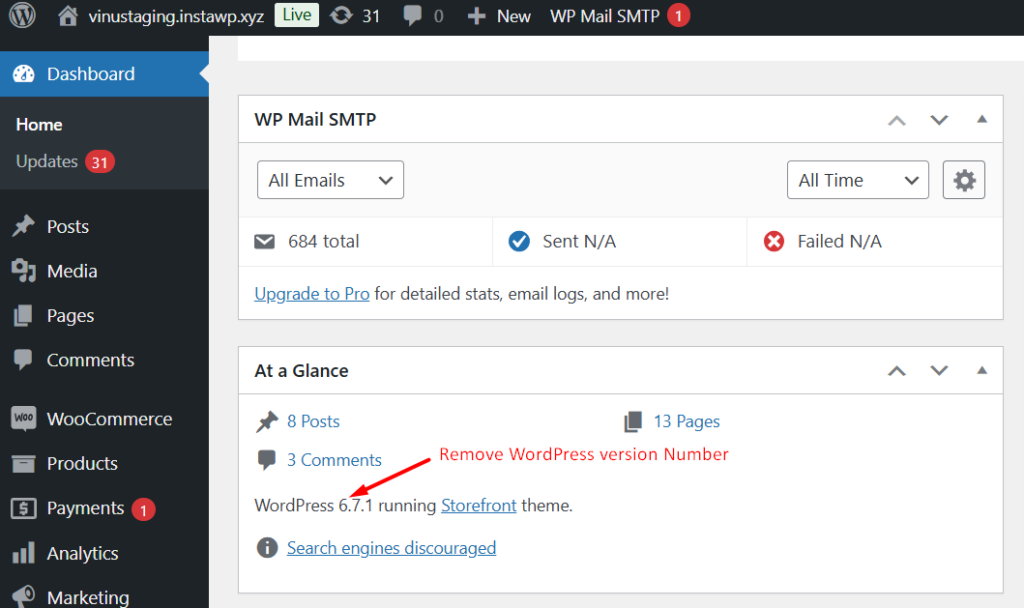
The code snippet helps to hide WordPress version details invisible from certain sections of the admin area of your website. Specifically:
- It hides the version info that shows up in the “Right Now” section on the dashboard.
- It hides the WordPress version number that usually appears at the bottom of the admin page.
function ts_remove_wp_version_number_and_update_notice() {
    // Remove the update notice for all users
    remove_action('admin_notices', 'update_nag', 3);

    echo '<style type="text/css">
    #wpfooter,                  /* Hides WordPress version in the footer */
    #wp-version-message,        /* Hides WordPress version message in the "At a Glance" widget */
    #dashboard_right_now .main p {
        display: none;
    }
    </style>';
}
add_action('admin_init', 'ts_remove_wp_version_number_and_update_notice');
Further Reading
Want to Customize Your Admin Bar → Learn How to Replace ‘Howdy Admin’ Today!